
 PV
PV TG
TG MN
MN EM
EM EI
EI ND
ND
 CT Scan
 PET CT
 Digital X-ray
 Ultrasound
 Amniocentesis
 Fetal Reduction
 Thermalytix Breast Screening
 Cardiology
 Lab Tests
 GAMCA Pre-Medical
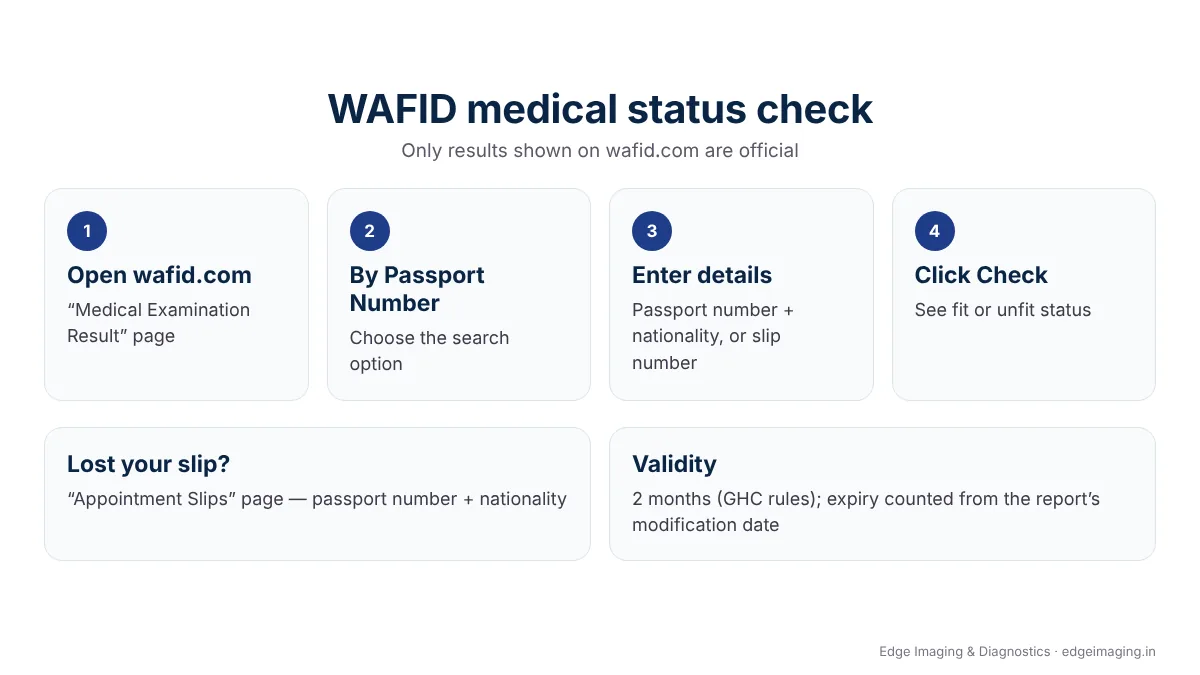
To check your WAFID (GAMCA) medical result, open the “Medical Examination Result” page on the official site, wafid.com, choose “By Passport Number”, enter your passport number and nationality (or your slip number) and click “Check”. Your appointment slip can be reprinted from the “Appointment Slips” page using your passport number and nationality. Only results shown on wafid.com are official.
After the medical, most people want to know one thing: fit or unfit? This guide shows exactly where to check, what to do if the result does not appear, how validity is counted, how to correct wrong details, and how to avoid fake “reports” sold by agents.
WAFID status check: at a glance
- Official site: wafid.com (Gulf Health Council)
- Result page: Medical Examination Result — passport number + nationality, or slip number
- Slip reprint: Appointment Slips — passport number + nationality
- Validity: 2 months under the GHC regulations; expiry is counted from the report’s modification date (WAFID FAQ)
- If unfit: a new appointment can be booked 2 months after the date of the existing report (WAFID FAQ)
What this guide covers
- How to check your WAFID medical result
- How to find or reprint your appointment slip
- If your result is not showing
- What fit and unfit mean
- How long the result is valid
- Wrong name or passport details
- How to spot a fake result
- Seedhi baat: WAFID result kaise check karein
- Frequently asked questions
How to check your WAFID medical result
- Go to wafid.com › Medical Examination Result.
- Under “Your Medical Examinations Results”, choose By Passport Number.
- Enter your passport number exactly as it is on the passport.
- Select your nationality (India) from the list. You can also search using your GCC or WAFID slip number.
- Click Check.
The WAFID FAQ puts it simply: from the check-candidate-status tab, enter the passport number and the nationality, or the slip number.
How to find or reprint your appointment slip
Lost the slip you received after booking? Open wafid.com › Appointment Slips, enter your passport number and nationality, and download it again. The slip shows the medical centre assigned to you. If you want to change the city, the WAFID FAQ says you can do so only after the current slip expires.
If your result is not showing
- Check your details. The passport number and nationality must match what was entered at booking.
- Give it time. Results appear only after the centre completes and uploads them. The FAQ’s wording on timing is unclear, so do not panic if it is not there the same day.
- Ask the medical centre whether your file is complete. Sometimes a repeat sample or an extra test is needed.
- Contact WAFID support through the contact options on wafid.com, with screenshots, if the centre confirms the upload but nothing appears.
What fit and unfit mean
Fit means the approved centre found none of the conditions on the GCC unfit list. Unfit means at least one was found — most often a chest X-ray change from active or past TB, hepatitis B or C, HIV, uncontrolled diabetes or blood pressure, or severe anaemia. Our guide to GAMCA medical unfit reasons explains each one and what can be corrected.
If your result is unfit, the WAFID FAQ says: “The applicant may rebook a new appointment 2 months after the date of the existing report.” Some sources mention 3 months.
How long the result is valid
Under the Gulf Health Council regulations, the medical certificate is valid for 2 months for visa purposes. The WAFID FAQ adds that the expiry date is calculated from the report’s modification date, not the original examination date, and that the examination date itself cannot be changed. Plan your visa stamping and travel within that window, and remember that most GCC countries do another medical after you arrive.
Wrong name or passport details
If something on your record is wrong, the WAFID FAQ says the medical centre can submit a change request (change of candidate details or of the medical exam request), and that this is free. Contact the centre that did your medical; do not pay an agent to “fix” it.
How to spot a fake result
- A real result can always be checked on wafid.com with your passport number. A paper or PDF that does not match wafid.com is not valid.
- Be careful of anyone who offers to “change” an unfit result to fit. In 2024–25 Kerala police uncovered a racket that misused a centre’s WAFID login to issue fake fit certificates, with arrests in several states, including Delhi.
- GCC countries test again after arrival, so a fake fit result can cost you the job and the visa.
Haven’t booked yet? Check your health first — ₹4,999, same-day report
Our GAMCA / WAFID pre-medical test in West Delhi runs the same panel as the GCC medical, so you see your results before anything is uploaded to WAFID. We are not a GAMCA / WAFID-approved centre, and our report is not a visa certificate.
Seedhi baat: WAFID result kaise check karein
wafid.com par “Medical Examination Result” page kholein, “By Passport Number” chunein, apna passport number aur nationality (India) daalein, ya slip number daalein, aur “Check” dabayein. Slip kho gayi ho to “Appointment Slips” page se passport number daal kar dobara nikaal sakte hain.
Result na dikhe to pehle details check karein, phir centre se poochein. Sirf wafid.com par dikhne waala result hi asli hai — kisi agent ke bheje PDF par bharosa na karein. Medical book karne se pehle apni sehat check karwana chahte hain to hamara GAMCA medical kaise hota hai guide bhi padhein.
Frequently asked questions
How do I check my WAFID medical status?
Open the Medical Examination Result page on wafid.com, choose By Passport Number, enter your passport number and nationality (or your slip number) and click Check.
How can I check my GAMCA medical report online with an Indian passport?
Use the same WAFID page: enter your Indian passport number and select India as nationality. GAMCA medical results are now shown on wafid.com.
How do I reprint my WAFID appointment slip?
Open the Appointment Slips page on wafid.com and enter your passport number and nationality to find and print the slip again.
How long is a WAFID medical result valid?
Under the Gulf Health Council regulations, 2 months. The WAFID FAQ says the expiry is counted from the report’s modification date.
Why is my WAFID result not showing?
Usually because the centre has not finished uploading it, or the passport number or nationality entered does not match the booking. Check your details, ask the centre, and contact WAFID support if needed.
Can wrong details on my WAFID record be corrected?
Yes. According to the WAFID FAQ, the medical centre can submit a change request, and it is free.
WAFID medical result kaise check karein?
wafid.com ke Medical Examination Result page par passport number aur nationality, ya slip number daal kar Check dabayein.
The bottom line
Your WAFID result lives on one place only: wafid.com. Check it with your passport number, keep your slip, plan travel within the validity, and never trust a result you cannot see on the official site.
Written by the medical team at Edge Imaging & Diagnostics, West Delhi. Last reviewed: October 2026. Sources: wafid.com (Medical Examination Result, Appointment Slips and FAQ pages), Gulf Health Council regulations, and published news reports.
Disclaimer: this article is general information as of October 2026. Edge Imaging & Diagnostics is not a GAMCA / WAFID-approved medical centre and is not connected to the WAFID system. Website pages and rules can change.